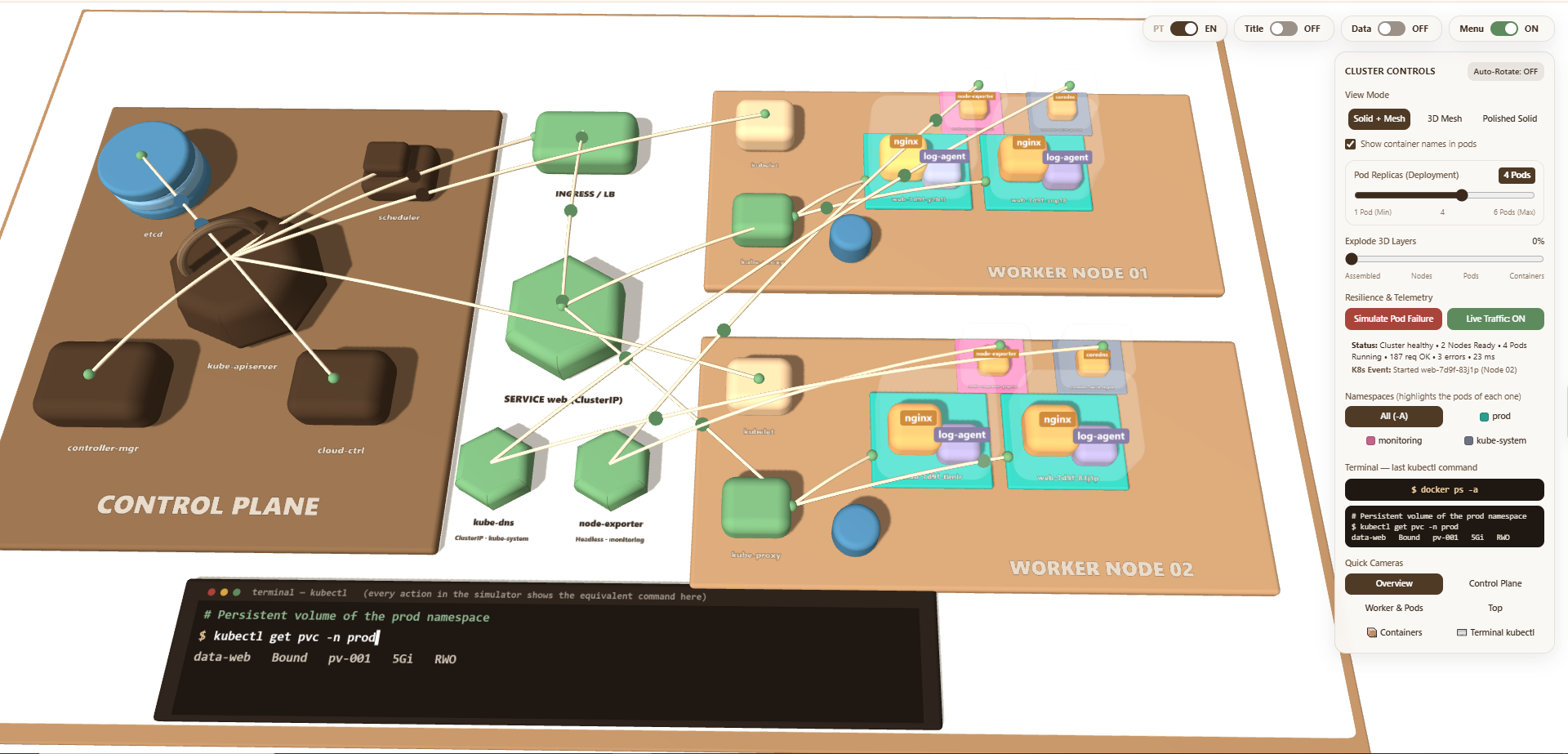
Controllers running in loops, the scheduler picking nodes, Services following Pods that come and go. Almost none of it shows up in a terminal. I built an open source 3D simulator that turns a cluster's architecture into something you can rotate, click and break, and every action shows the matching kubectl command. This page explains every concept you meet in it.
Every cluster has two parts. The control plane decides what should happen. The worker nodes do the work. The colors below match the simulator's legend.
Control Plane decides and stores state
kube-apiserver
The front door. Your kubectl, the kubelet and the controllers only talk to it. It authenticates, validates and writes every request to etcd.
The building's reception desk: nobody gets in without going through it.
kubectl cluster-info
etcd
The key-value store that holds cluster state: everything that exists and everything you asked for. Lose etcd and the cluster forgets who it is.
The ledger. Back it up.
etcdctl get /registry/pods --prefix --keys-only
kube-scheduler
Finds Pods with no node yet and picks where each one runs, weighing CPU, memory, affinities and taints.
kubectl get pods -o wide
kube-controller-manager
Runs the control loops (ReplicaSet, Deployment, Node, Job). Each one compares desired state with actual state and fixes the gap.
kubectl get rs -n prod
cloud-controller-manager
Talks to the cloud provider: creates load balancers, routes and disks, and notices when a VM is gone.
kubectl get svc -o wide
Worker Node runs the workloads
kubelet
The agent on every node. It gets that node's Pod list from the apiserver, asks the runtime to start the containers and reports health back.
kubectl describe node worker-1
kube-proxy
Programs the network rules (iptables or IPVS) so a Service IP reaches a healthy Pod on any node.
kubectl get endpoints web -n prod
Pod
The smallest unit in Kubernetes: one or more containers sharing an IP and volumes. In the simulator, each Pod is a glass box holding nginx (app) and log-agent (sidecar).
A sidecar is a helper container in the same Pod: it ships logs, proxies traffic or renews certificates.
kubectl logs web-7d9f-8ks7u -c log-agent -n prod
Container runtime
containerd or CRI-O actually runs the containers. Listing all of them, stopped ones (Exited) included, shows the restart history.
docker ps -a
Volumes and PVCs
Storage that outlives the container. The Pod asks for a PersistentVolumeClaim and the cluster binds a PersistentVolume.
kubectl get pvc -n prod
Desired state and self-healing
You declare what. The cluster works out how.
You don't tell Kubernetes "start one more Pod". You say "I want 4 replicas" and the controllers keep working until reality matches. That is why a crashed Pod comes back on its own.
Observe
The controller watches the apiserver and counts how many Pods with the label app=web exist right now.
Compare
It checks that number against the replicas declared in the ReplicaSet.
Act
It creates or deletes Pods to close the gap. The scheduler picks a node, the kubelet starts the containers, and the loop starts again.
Deploymentmanages →ReplicaSetkeeps N →Pods
Worker Node 01
Worker Node 02
Networking
Pods die. The Service address doesn't.
Every recreated Pod gets a new IP, so nothing should talk to a Pod directly. A Service provides a stable name and IP, and kube-proxy hands the traffic to a healthy Pod. In the simulator, the Live Traffic button animates exactly this path.
ClusterIP · prod
web
The default. An internal virtual IP that load-balances across the app's Pods. It is reachable only inside the cluster; the Ingress exposes it to the outside.
kubectl get svc web -n prod
ClusterIP · kube-system
kube-dns
The cluster DNS (CoreDNS). It turns web.prod.svc.cluster.local into the Service IP.
kubectl get svc kube-dns -n kube-system
Headless · monitoring
node-exporter
With clusterIP: None there is no virtual IP: DNS returns each Pod's IP. Ideal when Prometheus has to scrape every instance.
kubectl get endpoints node-exporter -n monitoring
There are also NodePort (opens a port on every node) and LoadBalancer (the cloud-controller-manager provisions a load balancer at the provider).
Namespaces
One cluster, many neighborhoods.
Namespaces split a cluster into separate spaces for names, permissions (RBAC) and resource quotas. Two teams can each have a Service called web without a clash. In the simulator, each Pod's base shows its namespace color.
application
prod
Where the app runs. Usually with a ResourceQuota and access limited to the owning team.
deploy/web
svc/web
ingress
kubectl get pods -n prod
observability
monitoring
Tools that watch the cluster without mixing with the app: exporters, Prometheus, Grafana.
ds/node-exporter
svc headless
kubectl get pods -n monitoring
system
kube-system
Kubernetes' own components. Only touch this if you know what you are doing.
coredns
kube-proxy
svc/kube-dns
kubectl get pods -n kube-system
From 3D to the terminal
Every click in the simulator is a real command.
The terminal on the cluster floor shows the equivalent of every action. These are the ones you will see there.
Move the replicas slider
kubectl scale deploy/web --replicas=4 -n prod
Simulate Pod failure
kubectl delete pod web-7d9f-8ks7u -n prod
Click a Pod
kubectl describe pod web-7d9f-8ks7u -n prod
Read the app logs
kubectl logs web-7d9f-8ks7u -c nginx -n prod
Filter by namespace
kubectl get pods -n monitoring
List the Services
kubectl get svc -A
Containers on the node, stopped ones too
docker ps -a
Deploy the app from scratch
kubectl apply -f web-deployment.yaml -n prod
Open source · MIT · runs in the browser
Rotate, click and break a cluster.
Nothing to install, no cloud account. Drag to rotate 360°, explode the layers into nodes, Pods and containers, kill a Pod and watch the controller bring another one back. The interface is in English and Portuguese.